Easy Steps to Make a Blog

There may be between you who do not know about blogs and wondering about the blog, and then Ill review a bit about the blog version of my own.


1. What is a Blog?

Blog (short for Web log) is a site that is more personal, the more weight to the depiction of the creator of the blog itself.

Blog is created by the designers so that the blog works automatically and is easy to operate, so for us-we who are still confused with the programming language to create a website it does not matter. If you can make an email account on the internet, then in making sure you can have a blog too.


2. How to create a blog

Like e-mail, create a blog we must also have an account first, so please register your self in the first free blog provider (hosting provider / domain free blog). Free blog provider is very much on the internet and there are several popular at this time is http://www.blogger.com , and http://www.wordpress.com, http://blogsome.com.

In the opportunity this time I will review the blog about the making of the http://www.blogger.com, Please click the picture below to register.

Once you are on the blogger.com site, you will see images such as picture above. Please do the following steps:

  • Click the arrow labeled "Create YOUR BLOG"
  • Fill in the Email Address, your email address (certainly valid)
  • Fill in your return email address on the form before Retype email address
  • Enter the password that you want in the form Enter a password
  • Fill in your password again just now in the form retype reset the password (password)
  • Content Display Name with the name you want to show
  • Write the text contained in the Word Verification form. Marked TIK / check the box on any posts on the edge and I accept the Terms of Service.
  • Click image arrow labeled "CONTINUE"

3. Content (Content) blog:

For the beginners, they usually upset after making a list of what blogs have to fill in the (post) in a blog. Content (content) from a blog, of course, its up to the owner of blog itself, like whether the contents of poetry, adventure of life, engineering, or whatever. Well here I recommend that, fill your blog with interest and expertise hobby or your own, because, of course, outside there are so many people that would equal his hobby and interests with you, so that they will be interested to read your writings.



Need A Great Sound From Your Notebook Asus NX90

If you are a notebook user that also uses desktop PC, you’ll definitely experience this, a your notebook produces a poor sound quality. The sound from notebook is not as rich as what you hear from your desktop PC’s speakers. Everyone knows it.

You know that a great sound needs a great speaker driver, and notebook doesn’t have enough space for that. Great driver is not enough, there must be a great bass sound that converted into an acoustic power. 100-500 Hz sound frequency cannot be produced properly by conventional notebook. Loud is not enough. There are some small moving parts in the notebook that make a lot of noises.

Now, if you need a great sound from your notebook, here it comes the Asus NX90 that claims to produce a really great sound.

Need A Great Sound From Your Notebook - Asus NX90

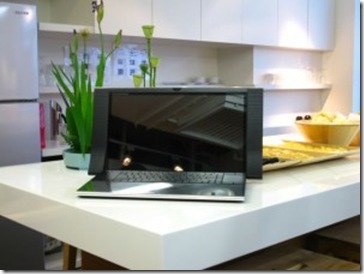
As you can see, Asus NX90 has two big speakers on the right and left side of its LCD panel. This speakers’ positioning is believed as the best position in order to produce the best sound out of them.

The result is quite incredible. When the sound volume is set to the highest level, it still can maintain a clear and undistorted sound. The bass sounds deep, the treble is clear and able to fill the room just perfectly. Is there any secret on this?

Asus proudly equip NX90 with Asus SonicMaster technology that was developed with Bang & Olufsen, a well known vendor in audio equipment gadgets. NX90’s speakers are 10 times better than any regular notebook. It will give a different experience at enjoying music and movies through the great speakers, including an echo and cinematic feeling. Another special thing you’ll get from Asus NX90 is the fact that the is the first notebook in the world that uses two touch pads!! They are placed on the left and right side of the keyboard. No so common than, we have to get used to them.

What’s not so good about Asus NX90?

It is heavy, about 4 kg. Asus said that this notebook is not for people who travel a lot. Asus NX90 is designed to be always in an open position. The great and beautiful casing shows that whoever has it is never hesitate to show off.

SonicMaster technology is not only planted into Asus’ NX notebooks series. It is also available in the N series, and Asus’ PC AiO – the EeeTop PC ET2400.

What is SonicMaster technology anyway?

SonicMaster is a result from a combined audio hardware and software that focused on reproducing natural sound without interferencing certain sound’s frequencies. So, by using SonicMaster listeners are assured that they are hearing a real natural sound, not a software generated sound.

Find Asus products on Amazon.com!

Share this post :
Technorati Tags: Asus NX90

Three simple rules for affairs a new laptop

This is the time of year if friends, ancestors members, accidental acquaintances, and humans in the artery stop me to ask about affairs a new PC. 

"What should I get?" they ask. "What do I need?" Also heard with accretion frequency: "Should I get a book instead of a laptop?"

Loaded questions, to be sure, but not difficult ones. A book can yield the abode of a laptop if all you do is browse the Web and apprehend e-mail. If you charge to get any austere plan done, whether for academy or business or just accustomed life, a laptop is still the smarter choice. It gives you a keyboard, a bigger screen, copious amounts of storage, and affinity with all your admired software.
 
So, what affectionate of laptop should you get, and with what specs and features? I can accomplish this absolutely simple:

1. Get at atomic 4GB of RAM.

Thats "four gigabytes of memory" for those who dont allege PC. Anything beneath and your arrangement will run like molasses--something to accumulate in apperception as Black Friday deals cycle around. Many "doorbuster" laptops will accept abandoned 2GB of RAM, and thats just not enough.

2. If you can allow it, get a arrangement with an SSD.

Thats abbreviate for "solid-state drive," which has no affective locations and accordingly runs faster, generates beneath heat, and consumes beneath ability than a acceptable harder drive. Youll pay a exceptional for an SSD and end up with beneath accumulator space, but how abundant do you absolutely need? Most association I apperceive rarely ample up added than 100GB. 

Indeed, although a 128GB SSD may assume like a decline compared with, say, a 500GB harder drive, the acceleration allowances abandoned are account the added money.
 
3. Try afore you buy.
 
Although brick-and-mortar tech food are few and far amid these days, there are still places area you can go and browse laptops in person. And thats something you should absolutely do.
Sure, you can boutique online based on specs and price, but you owe it to yourself to test-drive the keyboard. And the trackpad. Accomplish abiding theyre adequate and responsive. Likewise, analysis the screen: is it bright and accordingly abundant on the glare? Whenever possible, try to lay easily on a laptop afore affairs it. 

One added "rule."

Notice that I didnt acknowledgment the procesor. Unless youre accomplishing able video alteration or arena a lot of graphics-intensive games, the processor just isnt the big agency it acclimated to be. Theyre all appealing fast nowadays. 

As for brands, I accept agnate feelings: theyre all appealing acceptable nowadays. That said, its consistently a acceptable abstraction to do your homework, starting with PC Worlds Reliability and Satisfaction surveys.
What added admonition would you accord to anyone arcade for a new laptop?
php development company in india ,  Wordpress development company in indiaseo company in india

Lenovo ThinkPad X100e Not a Netbook It Is Truly a Notebook

Lenovo ThinkPad X100e
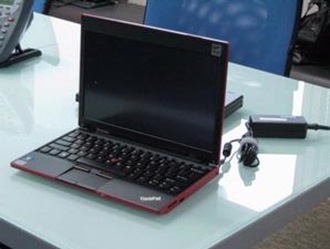
Together with the ThinkPad Edge, Lenovo has previewed other new notebook. The Lenovo ThinkPad X100e. Something that can grab attention? The dimensions! It is typically smaller than the ThinkPad X series. The screen is 11.6", slightly smaller than the X200’s 12" display. This is an ultra portable series notebook, not even a netbook.

Although the ThinkPad X100e only equipped with 11.6” display, but the 1366x768 display resolution is quite satisfying. The memory can be upgraded up to 4GB. The hard drive is also upgradeable to 320BG and 500GB. The standard Lenovo ThinkPad X100e is completed with 2GB RAM, and 250GB hard drive.

You’ll find ThinkPad X100e in black, red, and white. It uses 6-cell battery that is claimed to stand for about 5 hours of computing. It comes with Windows 7 pre-installed. If you are looking for Intel Inside logo, then you’ll be sorry, for the X100e uses Neo AMD Athlon processor.
In addition, the modem module is mounted in the unit, allowing users to surf the Internet while the SIM card is inside, when there is no possible wifi connection arround. The modem module itself is removable. There will be be two versions, with the built in modem installed and without the modem. Unfortunately, the location of the SIM card slot is not easy to reach. It is put behind the cover. To install the SIM card, we have to remove seven screws first.
But just like the Lenovo ThinkPad Edge, X100e has three USB ports, one of them is the USB port power-on, the USB port that can be used to charge USB devices like iPods as the notebook is off. Just like ThinkPad Edge, X100e does not have internal optical drive.
In US, this ultra portable notebook is sold at a low price, only $ 499. In Thailand, this approximately 1.5 kg with 6-cell battery notebook was sold 1000 units on its releasing day. With its attractive price, it can sweep the netbook market easily. Well, we’ll see.
Buy Lenovo ThinkPad X100e from Amazon!

Share this post :

Technorati Tags: Lenovo,ThinkPad Edge,ThinkPad X100e,X100e,Notebook

Canon Legria HF S200 A Camcorder With Binocular Technology

From their features and specification, you can see that Canon Legria HF S200 and Canon Legria HF S21 are almost identical. One of their identical feature is the Smart Auto. At first, this Smart Auto feature introduced on Canons digital cameras. But now you can also enjoy the great Smart Auto feature on your Canon HD camcorder. Smart Auto is a mode to let you record your videos a lot easier, especially for new users and beginners.
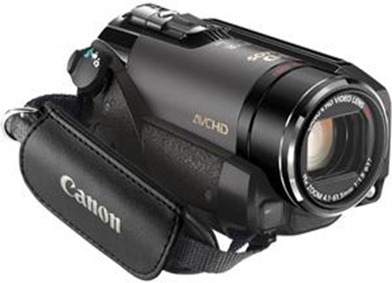
Canon Legria HF S200 With this feature, your Canon camcorder will automatically detect and analyze the brightness, color, distance, and movement. Based on the result then, the camcorder will choose the best setting for the scenes that are being taken. There are 31 different scenes that are recognized by this Smart Auto feature on Canons HD camcorders like the Legria HF S200 and Legria HF S21 without any interfere from the user.

Another interesting feature of this Legria HF S200 is the use of 8,59 mega pixel CMOS sensor. It has 10x optical zoom and Powered IS feature. Beside the Dynamic SuperRange Optical Image Stabilization, the Powered IS provides a higher compensation for any disturbing movements. It will reduce any unwanted blurred videos when you use it to take videos with maximum zooming. You can activate this pretty great feature by pushing the Powered IS button on LCD panel. The Powered IS feature is actually adopted from Canon Binocular. It guarantees a great sharp and focus videos or photo.
Now, the question is what are the differences between HF S21 and HF S200? The main difference is the amount on their internal memory. HF S21 has 64GB flash memory, while the HF S200 has no internal memory. Thats why you have to spend extra money to buy separate memory card.
The other difference is that HF S200 has now electronic viewfinder. All tasks are supposed to be done on its LCD screen.
These Canon Legria HF S21 and HF S200 are camcorders with rich and powerful features. It is really the best choice for advanced users. Are you?
Share this post :

Technorati Tags: Canon,camcorder,Legria

Bump Technologies a 3D Desktop Developer Has Been Seized by Google

What other plans are being designed by Google? This time, Bump Technologies, a technology company that develops a three-dimensional (3D) has been seized.

3D Bump Top

Bump Technologies has been known as the maker of BumpTop, a free application that can change the appearance of two-dimensional images into three dimensions on the screen. In addition, BumpTop also has a great feature that enable motion sensor which is used on a touch screen.

"We are proud to announce that we have acquired the Google," said an announcement on the front page of the companys website, written on Friday (4/30/2010). BumpTop free version can still be downloaded but only until next Friday. Bump is not planning to release the next update. Meanwhile, for users who pay a pro BumpTop will still get lifetime support.

Currently, there is no information yet on where these technologies will be developed. However, so far related to the development of desktop operating system, Google Chrome is currently developing the OS. On the other hand, Google has also developed Android operating system for smart phones and netbooks  to tablets.

 
IT Maintenance © 2012 | Template By Ja